Showing posts with label windows 10. Show all posts

Friday, August 11, 2017

Windows Server 2016 compatibility with McAfee products

Windows Server 2016 compatibility with McAfee products
Technical Articles ID: KB87945
Last Modified: 4/6/2017

Environment

Multiple McAfee business and enterprise products

Microsoft Windows Server 2016

Summary

McAfee is committed to supporting the Microsoft release cadence for Windows Server 2016 and we are working closely with Microsoft to ensure that McAfee software and hardware products are fully compatible with Windows Server 2016.

To ensure release quality, all new releases that Microsoft publishes for Windows Server 2016 require full validation by the individual product teams, with the goal of providing zero day support for all Windows Server 2016 releases over time for those products that do not currently offer this cadence.

Any late breaking changes the Microsoft implements to a release, or any unresolved compatibility issues raised by McAfee with Microsoft around a scheduled release, could lead to schedule changes that will be documented and updated in this article. Additional information about Windows Server 2016 support for McAfee products will use standard communication methods including the Support Notification Service (SNS).

Recent updates to this article
DateUpdate
April 6, 2017McAfee rebrand changes. No new content.
Mar 21, 2017Removed Database Security Scanner (EOL) and Integrity Monitor (EOL); added MAR 2.x.
Mar 01, 2017Added MSME 8.5.1.
Feb 28, 2017Added footnote 3 for VirusScan Enterprise.
Nov 19, 2016Added MOVE 4.5 RTW

To receive email notification when this article is updated, click Subscribe on the right side of the page. You must be logged in to subscribe.

To receive information about McAfee product updates, sign up for the Support Notification Service athttps://sns.secure.mcafee.com/signup_login.


NOTES:
  • Future release dates are subject to change.
    NOTE: Any future product functionality or releases mentioned in the Knowledge Base are intended to outline our general product direction and should not be relied on, either as a commitment, or when making a purchasing decision.
  • RTW = Released To World
  • RTS = Released To Support, also called Managed Release. Customers who want to participate in a Managed Release program should contact their Technical Account Manager (TAM) or Support Account Manager (SAM).
  • For details about Service Packs, patches, hotfixes, maintenance releases, and the patch release cycle, see KB51560.

McAfee ProductsWindows 2016 Standard
Minimum Supported Version
Windows 2016 Data Center
Minimum Supported Version
Endpoint Protection Products
Active ResponsePending UpdatePending Update
Application and Change Control8.0.1
(Release date pending)
8.0.1
(Release date pending)
Data Loss Prevention Endpoint (DLP Endpoint)1H, 20171H, 2017
Endpoint Security (ENS)10.2 (RTW)
10.1.2 (RTW)
10.2 (RTW)
10.1.2 (RTW)
Host Intrusion Prevention (Host IPS)8.0 Patch 8 (RTW)8.0 Patch 8 (RTW)
SiteAdvisor Enterprise (SAE)3.5 Patch 5 (RTW)3.5 Patch 5 (RTW)
Threat Intelligence for Endpoint Security ClientPending UpdatePending Update
Threat Intelligence Exchange (TIE) Module for VSE1.0.2 (RTW)1.0.2 (RTW)
VirusScan Command Line ScannerPending UpdatePending Update
VirusScan Enterprise (VSE)8.8 Patch 8 Hotfix 115967538.8 Patch 8 Hotfix 11596753
Database Security Products
Database Activity Monitoring (Standalone Management)Pending UpdatePending Update
Database Activity Monitoring (ePO Management)Pending UpdatePending Update
Vulnerability Manager for Databases (Standalone Management)Pending UpdatePending Update
Vulnerability Manager for Databases (ePO Management)Pending UpdatePending Update
Data Center Protection Products
Management for Optimized Virtual Environment (MOVE) Multi-Platform4.5 (Dec 2016)4.5 (RTW)
Data Protection Products
Drive Encryption (DE)7.2.0 (RTW)
DE 7.1.3 HF1148978
7.2.0 (RTW)
DE 7.1.3 HF1148978
File and Removable Media Protection (FRP)5.0.2 25.0.2 2
Management of Native Encryption (MNE)4.0.0 (RTW)4.0.0 (RTW)
Security Management Products
Data Exchange Layer (DXL)2.0.0 (RTW)2.0.1 Patch 1 (RTW)
McAfee Agent (MA)5.0.4
4.8.0 Patch 3
5.0.4
4.8.0 Patch 3
Policy Auditor Agent (PA)6.2.0.309 16.2.0.309 1
Rogue System Detection5.0.45.0.4
Web Protection
McAfee Client Proxy (MCP)2.1 (RTW)2.1 (RTW)
Mail Gateway Protection
McAfee Security for Microsoft SharePointPending UpdatePending Update
McAfee Security for Microsoft Exchange (MSME)8.5.1 8.5.1
1For the Policy Auditor Agent, the November 2016 content update is required.
2IMPORTANT: FRP is not supported on Windows Servers; the reference in this table is only used for network share testing.
3VSE 8.8 Patch 8 Hotfix 1159675 is not supported when Windows Server 2016 is installed in either Server Core or Nano Server mode. For details of a known issue, see KB88819.


- Link here


- wong chee tat :)

Thursday, February 23, 2017

MetaTrader 5 Platform Build 1545: fast switching between windows and changing price values with the mouse wheel

17 February 2017

MetaTrader 5 Platform Build 1545: fast switching between windows and changing price values with the mouse wheel


Terminal

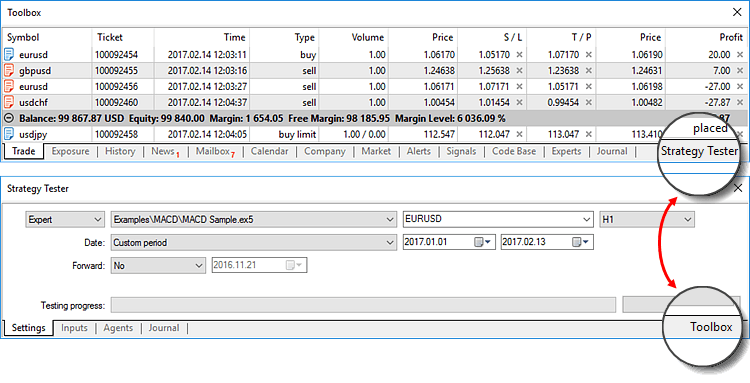
  1. Fast switch between the 'Toolbox' and 'Strategy Tester' windows.
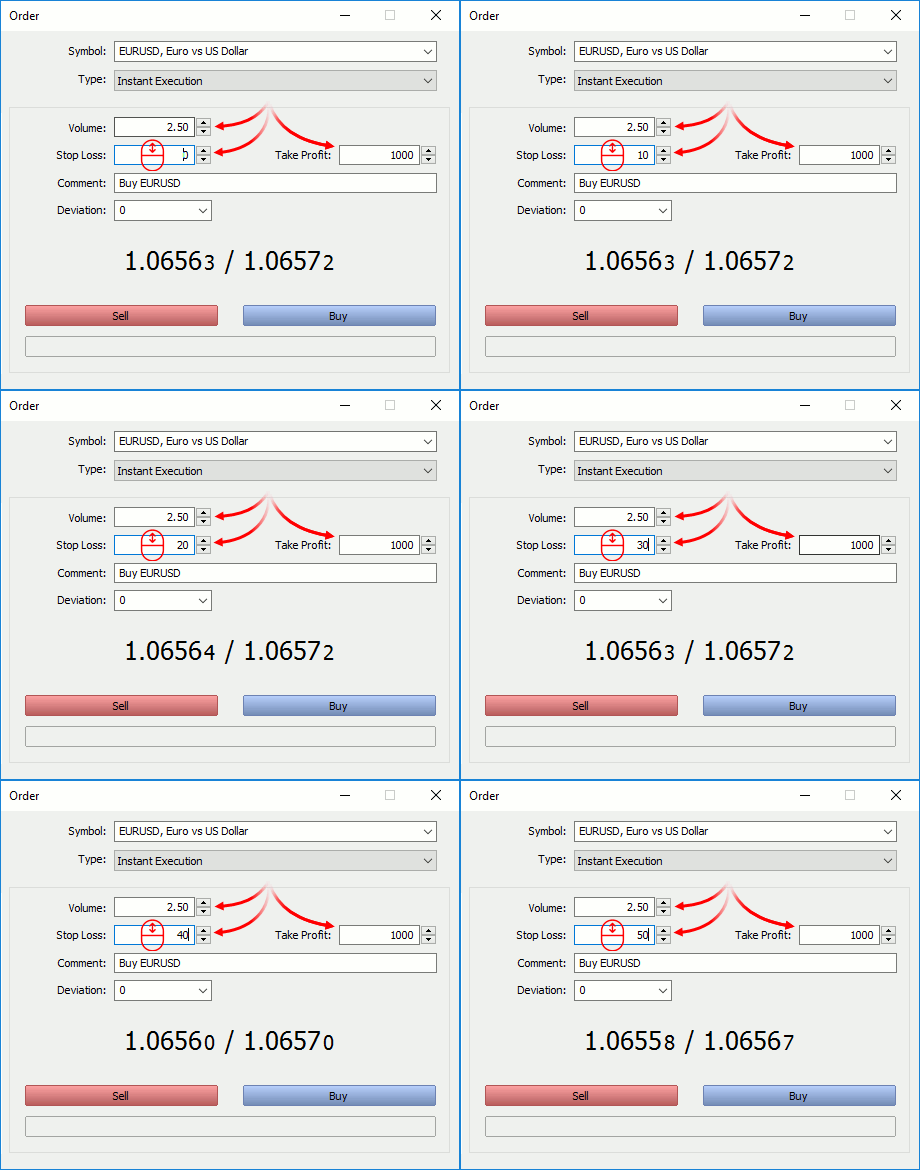
  2. New option allows editing prices and volumes of orders using the mouse wheel:

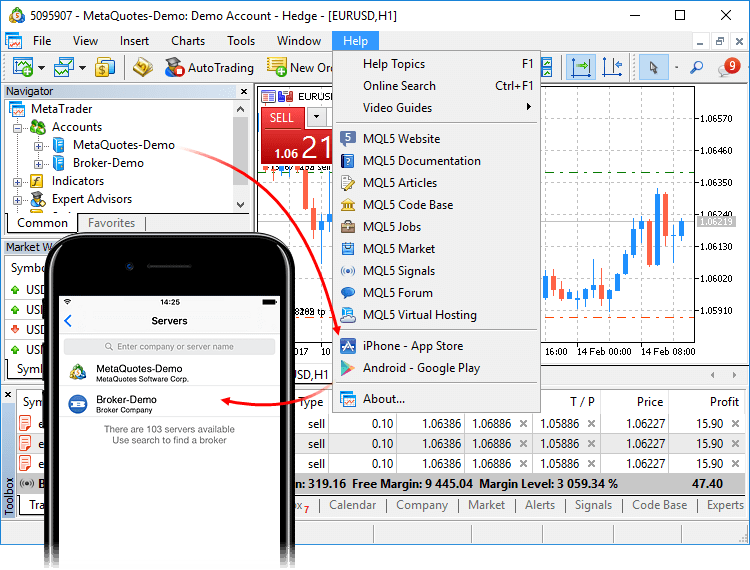
  3. Now, when you go to download mobile terminals, the list of your trade servers is remembered. Then, when you install MetaTrader on your iPhone or Android device, a ready list of servers will be shown to you. You can quickly connect to your existing trading accounts. The server of the currently connected account will be displayed first in the mobile terminal.

  4. Significantly reduced load on the terminal, created by invisible (minimized) charts and objects.
  5. Fixed occasional incorrect triggering of trailing stop levels.
  6. Fixed filtering of trades by symbol in the account trading history.
  7. Fixed display of the 'Type' field in the history of positions.
  8. Fixed presentation of the trading history in the form of positions.
  9. Fixed display of custom indicators whose drawing type is DRAW_COLOR_LINE, DRAW_COLOR_ZIGZAG and DRAW_COLOR_SECTION, in case CLR_NONE is used for the color.

MQL5

  1. Fixed template typing using a constant pointer.
  2. Fixed control of access to private and protected class members.

Tester

  1. Fixed activation of limit orders on Exchange instruments, when the order trigger price is worse than the current market (the Buy price is higher than or the Sell price is lower than the market price).
  2. Removed restriction connected with testing of custom indicators having more than 64 input parameters.
  3. Added UI translation into Hindi.
Updated documentation.


- wong chee tat :)

Friday, February 10, 2017

MetaTrader 4 Platform build 1045

MetaTrader 4 Platform build 1045

Release Notes: MetaTrader 4

3 February 2017
The release of MetaTrader 4 platform is connected with the release of Windows 10 Insider Preview build 15007. Due to security updates in the new Windows 10 system version, MetaTrader 4 client terminals could occasionally fail to start.

Install the new platform version in order to prepare for the upcoming Windows 10 update.


- wong chee tat :)

Tuesday, January 31, 2017

VirtualBox 5.1.14 (released 2017-01-17)

VirtualBox 5.1.14 (released 2017-01-17)

This is a maintenance release. The following items were fixed and/or added:
  • VMM: fixed emulation of certain instructions for 64-bit guests on 32-bit hosts
  • VMM: properly handle certain MSRs for 64-bit guests on ancient CPUs without VT-x support for MSR bitmaps (bug #13886)
  • GUI: fixed a crash with multimonitor setups under certain conditions
  • GUI: allow cloning of snapshots when the VM is running
  • NVMe: fixed compatibility with the Storage Performance Development Kit (SPDK, bug #16368)
  • VBoxSVC: fixed a crash under rare circumstances
  • VBoxManage: added a sanity check to modifymedium --resize to prevent users from resizing their hard disk from 1GB to 1PB (bug #16311)
  • Windows hosts: another fix for recent Windows 10 hosts
  • Linux hosts: Linux 4.10 fixes
  • Linux Additions: fixed protocol error during certain operations on shared folders (bug #8463)

Maybe I should download and play with it.


- wong chee tat :)

Thursday, December 29, 2016

VirtualBox 5.1.12 (released 2016-12-20)

VirtualBox 5.1.12 (released 2016-12-20)

This is a maintenance release. The following items were fixed and/or added:
  • VMM: fixed VERR_IEM_ASPECT_NOT_IMPLEMENTED Guru Meditations with certain Linux guests if KVM paravirtualization is enabled (5.1 regression; bugs #15613and #16251)
  • VMM: fixed VERR_VMX_UNABLE_TO_START_VM Guru Meditations under rare conditions
  • GUI: prevent a crash under certain conditions if the VM is terminated very early
  • GUI: fixed certain keyboard capture issues (5.1.10 regression; Mac OS X hosts only; bug #16150)
  • GUI: fixed dragging guest windows in seamless mode with the keyboard captured (X11 hosts only; bug #15837)
  • GUI: fixed a problem where the new version detected dialog was covered by the appliance import dialog (Mac OS X hosts only; bug #16238)
  • Storage: fixed NVMe reset processing when doing rmmod nvme; modprobe nvme in a Linux guest (bug #16080)
  • Storage: fixed creating a snapshot when the VM is running and an NVMe controller is present
  • Storage: fixed a problem with the LsiLogic SCSI controller where requests could be lost with SMP guests
  • E1000: fixed "cable disconnected" issue (Mac OS X guests only; 5.1.10 regression; bug #16260)
  • E1000: fixed "TX unit hang" issue (Linux guests only; 5.1.10 regression; bug #16221)
  • Parallel ports: fixed port enumeration on Windows host (bugs #15872 and #16127)
  • API: don't crash when sanitizing certain VM names (bug #16299)
  • Linux hosts: automatically disable asynchronous I/O on Linux 2.6.18 kernels as high I/O load may trigger kernel oopses on these kernels if this feature is enabled
  • Linux hosts / guests: Linux 2.6.28 compile fix (bug #16267)
  • Linux hosts: compile Linux 4.9 compile fix (bug #16286)
  • Linux Additions: warn the user about a known bug with older Linux guests (e.g. Debian 7) requiring manual work to get 3D working (bug #15319)
  • Linux Additions: fix the graphics driver build with Linux 4.10 and later (bug #16298)
  • Windows Additions: fixed a crash in the WDDM driver under certain conditions
VirtualBox 5.1.10 (released 2016-11-21)

This is a maintenance release. The following items were fixed and/or added:
  • GUI: the USB filter settings dialog should allow to specify the USB revision in hexadecimal format (bug #15400)
  • GUI: fixed crash on certain hosts when pressing certain key combinations (Windows hosts only; bug #15719)
  • GUI: fixed issue with updating the available-geometry on host-screen work-area resize
  • GUI: don't crash / hang on certain environments if accessibility support is enabled
  • GUI: fixed various issues in Unscaled HiDPI Output mode (bug #15707)
  • GUI: extend the VM Input menu with Print Screen-related actions
  • GUI: improved handling of inserting the Guest Additions ISO image by trying all available optical drives rather than only the first one and by not asking the user if he wants to force unmounting (which doesn't work in most cases anyway)
  • API: default to RTC using UTC for Solaris 11 guests
  • Settings: be less restrictive when reading a VM configuration containing a host-only adapter without an interface name
  • Storage: fixed resizing VDI images resulting in an unbootable image under certain circumstances (bug #15983)
  • NAT: fixed several 5.1.8 regressions on Mac OS X and Windows hosts (bug #16084)
  • Audio: fixed a few 5.1.x regressions by using the audio code from 5.0.x until the audio overhaul is completed
  • VBoxManage: fixed documentation of the storagectl command (bug #15971)
  • Build system: another fix for building VirtualBox on systems which default to Python 3
  • Windows hosts: hardening fix for Windows 10 build 14971 (bug #16202)
  • Windows Additions: properly start the VirtualBox guest services even if the guest user name contains special characters (bug #15982)
  • Solaris Additions: fixed preemptible mouse notification callback being executed under a spinlock for Solaris guests
  • Linux hosts / guests: Linux 4.9 fixes (bugs #16155 and #16064)
  • Linux Additions: fixed Linux kernel module override rule (thanks Mark Furneaux)


Good time to install!

- wong chee tat :)


Friday, October 21, 2016

VirtualBox 5.1.8 (released 2016-10-18)

VirtualBox 5.1.8 (released 2016-10-18)

This is a maintenance release. The following items were fixed and/or added:
  • GUI: fixed keyboard shortcut handling regressions (Mac OS X hosts only; bugs #15937 and #15938)
  • GUI: fixed keyboard handling regression for separate UI (Windows hosts only; bugs #15928)
  • NAT: don't exceed the maximum number of "search" suffixes. Patch from bug #15948.
  • NAT: fixed parsing of port-forwarding rules with a name which contains a slash (bug #16002)
  • NAT Network: when the host has only loopback nameserver that cannot be mapped to the guests (e.g. dnsmasq running on 127.0.1.1), make DHCP supply NAT Network DNS proxy as nameserver.
  • Bridged Network: prevent flooding syslog with packet allocation error messages (bug #15569)
  • Audio: now using Audio Queues on Mac OS X hosts
  • Audio: fixed recording with the PulseAudio backend (5.1 regression)
  • Audio: various bugfixes
  • Snapshots: fixed regression in 5.1.4 for deleting snapshots with several disks (bug #15831)
  • Snapshots: crash fix and better error reporting when snapshot deletion failed
  • Storage: some fixes for the NVMe emulation with Windows guests
  • API: fixed initialization of SAS controllers (bug #15972)
  • Build system: make it possible to build VBox on systems which default to Python 3
  • Windows hosts: detect certain cases of REGDB_E_CLASSNOTREG errors and print a helpful error message
  • Windows hosts: adapted to changes in Windows 10 build 14901 (bug #15944)
  • Windows hosts: better support for processor groups on Windows 7 and later which is required on certain hosts with many CPUs
  • Windows installer / Additions: added option to prevent creating of start menu items (bug #15922)
  • Windows Additions / VGA: if the guest's power management turns a virtual screen off, blank the corresponding VM window rather than hide the window
  • Windows Additions: fixed a generic bug which could lead to freezing shared folders (bug #15662)
  • Linux hosts / guests: fix for kernels with CONFIG_CPUMASK_OFFSTACK set (bug #16020)
  • Linux Additions: don't require all virtual consoles be in text mode. This should fix cases when the guest is booted with a graphical boot screen (bug #15683)
  • Linux Additions: added depmod overrides for the vboxguest and vboxsf kernel modules to fix conflicts with modules shipped by certain Linux distributions
  • X11 Additions: disable 3D on the guest if the host does not provide enough capabilities (bug #15860)


- wong chee tat :)

Thursday, September 15, 2016

VirtualBox 5.1.6 (released 2016-09-12)

VirtualBox 5.1.6 (released 2016-09-12)

This is a maintenance release. The following items were fixed and/or added:
  • GUI: fixed issue with opening '.vbox' files and it's aliases
  • GUI: keyboard grabbing fixes (bugs #15771 and #15745)
  • GUI: fix for passing through Ctrl + mouse-click (Mac OS X hosts only; bug #15714)
  • GUI: fixed automatic deletion of extension pack files (bugs #11352 and #14742)
  • USB: fixed showing unknown device instead of the manufacturer or product description under certain circumstances (5.1.0 regression; bug #15764)
  • XHCI: another fix for a hanging guest under certain conditions as result of the fix for bug #15747, this time for Windows 7 guests
  • Serial: fixed high CPU usage with certain USB to serial converters on Linux hosts (bug #7796)
  • Storage: fixed attaching stream optimized VMDK images (bug #14764)
  • Storage: reject image variants which are unsupported by the backend (bug #7227)
  • Storage: fixed loading saved states created with VirtualBox 5.0.10 and older when using a SCSI controller (bug #15865)
  • Storage: fixed broken NVMe emulation if the host I/O cache setting is enabled
  • Storage: fixed using multiple NVMe controllers if ICH9 is used
  • NVMe: fixed a crash during reset which could happen under certain circumstances
  • Audio: fixed microphone input (5.1.2 regression; bugs #14386 and #15802)
  • Audio: fixed crashes under certain conditions (5.1.0 regression; bug #15887 and others)
  • Audio: fixed recording with the ALSA backend (5.1 regression)
  • Audio: fixed stream access mode with OSS backend (5.1 regression, thanks to Jung-uk Kim)
  • E1000: do also return masked bits when reading the ICR register, this fixes booting from iPXE (5.1.2 regression; bug #15846)
  • BIOS: fixed 4bpp scanline calculation (bug #15787)
  • API: relax the check for the version attribute in OVF/OVA appliances (bug #15856)
  • Windows hosts: fixed crashes when terminating the VM selector or other VBox COM clients (bug #15726 and others)
  • Linux Installer: fixed path to the documentation in .rpm packages (5.1.0 regression)
  • Linux Installer: fixed the vboxdrv.sh script to prevent an SELinux complaint (bug #15816)
  • Linux hosts: don't use 32-bit legacy capabilities
  • Linux Additions: Linux 4.8 fix for the kernel display driver (bugs #15890 and #15896)
  • Linux Additions: don't load the kernel modules provided by the Linux distribution but load the kernel modules from the official Guest Additions package instead (bug#15324)
  • Linux Additions: fix dynamic resizing problems in recent Linux guests (bug #15875)
  • User Manual: fixed error in the VBoxManage chapter for the getextradata enumerate example (bug #15862)


Good time to download and install!


- wong chee tat :)

Thursday, August 18, 2016

VirtualBox 5.1.4 (released 2016-08-16)

VirtualBox 5.1.4 (released 2016-08-16)

This is a maintenance release. The following items were fixed and/or added:
  • GUI: show actual VM uptime in the session information window
  • Audio: re-enabled speakers for Mac OS X guests (5.1.0 regression; bug #15611)
  • Audio: fixed crashes under certain conditions
  • USB: fixed a hang under certain conditions
  • USB: fixed a hanging guest under certain conditions (bug #15747)
  • PIIX4: implemented dummy SMBus controller to prevent annoying Linux kernel warnings about uninitialized SMBus base address (bug #9517)
  • NVMe: several fixes to improve stability, fixed a crash while saving a VM state
  • VMDK: Fixed an issue creating fixed size images with certain sizes and the Split2G option enabled (bug #15748)
  • VHDX: fixed cloning images with VBoxManage clonehd (bug #14288)
  • Storage: Fixed broken bandwidth limitation when the limit is very low (bug #14982)
  • EFI: fixed sending debug messages in the EFI firmware if a serial port is enabled (bug #12161)
  • OVF: when importing appliances, make sure that the version of the embedded VirtualBox-specific settings is processed, to get the default settings handling right
  • VBoxManage: Don't try to set the medium type if there is no change (bug #13850)
  • Linux installer: fixed some scripting issues (bugs #15701 and #15702)
  • Linux installer: fixed a path issue on certain Linux distributions (bug #15717)
  • Windows hosts: fixed corrupted mouse pointers with some Linux and Solaris guests (bug #15665)
  • Linux Additions: made the video driver work on 32-bit guests with large video memory sizes (bug #15621)
  • Linux Additions: made the video driver work on kernel 4.7 and later (bug #15769)
  • Linux Additions: converted a failure message to an informational one when drivers could not be stopped during upgrade (bug #15692)
  • Linux Additions: made the video driver work around an X server bug which cause screen refresh to stop (bug #15511)
  • Windows Additions: auto-resizing fixes for Windows 10 guests (bug #15257)
  • Windows Additions: fixed VBoxTray problems with Windows 2000 (bug #15661)


- wong chee tat :)

Thursday, July 28, 2016

clamav cvd download

Links to download cvd:

http://database.clamav.net/main.cvd

http://database.clamav.net/daily.cvd

The default database location is: "C:\Documents and Settings\All Users\.clamwin\db"

- wong chee tat :)

Sunday, July 24, 2016

VirtualBox 5.1.2 (released 2016-07-21)

VirtualBox 5.1.2 (released 2016-07-21)

This is a maintenance release. The following items were fixed and/or added:
  • VMM: several fixes
  • GUI: fixed screenshot if the VM is started in separate mode
  • GUI: fixed issue with double-click/opening registered file types (.vbox and .vbox-extpack) on Mac OS X (bug #15648)
  • GUI: fixed a bug which made it impossible close some error/warning messages using the close button
  • GUI: weakened the control over the VM window behavior allowing to resize it across multiple screens and to use in Snap Assist techniques
  • GUI: jump to the second tab of the session information window (5.1.0 regression)
  • GUI: fix for Alt-Tab
  • Storage: fixed creating fixed size VHD images (bug #15601)
  • Storage: fixed a hang during power off if the VM was suspended before and a NVMe controller is configured
  • USB: fixed a crash under certain conditions
  • Audio: make AC'97 volume control work again (5.1.0 regression; bug #15598)
  • Audio: fixed rare VM hangs when using AC'97 emulation
  • Audio: SB16 fixes
  • EFI: fixed access to devices attached to SATA port 2 and higher (bug #15607)
  • OVA: fix for checking certain signatures
  • OVA: fixed MAC address generation for appliances created by VirtualBox (5.1.0 regression; bug #15623)
  • API: fixed audio settings handling for older config files (bug #15626)
  • API: fixed truncation of USB product/vendor IDs on Linux hosts (5.1.0 regression; bug #15644)
  • API: fixed VRDP with authentication (bug #15653)
  • API: don't crash if there is no graphics controller configured (bug #15628)
  • Linux hosts: fixed EL5 builds (bug #15634)
  • non-Windows hosts: fixed a crash during shutdown under rare circumstances (bug #15568)
  • Linux Additions: fixed SELinux issue which prevented certain Linux guests to work in 3D mode (bug #15574)
  • User Manual: updates
VirtualBox 5.1 (released 2016-07-12)

This is a major update. The following major new features were added:
  • VMM: new APIC and I/O APIC implementations that result in significantly improved performance in certain situations (for example with networking, bug #15295)
  • VMM: added support for Hyper-V paravirtualized debugging of Windows guests
  • VMM: emulate even more MMIO and shadow pagetable exits without going back to user mode
  • GUI: overall migration to Qt5 (bug #11775)
  • GUI: passive API event listener improving the VM GUI performance and response time
  • Audio: added HDA (High Definition Audio) support for newer Linux guests
  • Audio: added on-demand timers which should improve the overall performance and reduce the CPU consumption
  • Audio: more fine-grained volume control for the AC'97 emulation, which now also takes the master volume control into account
  • better support for Python 3
In addition, the following items were fixed and/or added:
  • VMM: activate the x2APIC by default for Linux guests
  • VMM: many more fixes
  • GUI: the Detach UI action is now a part of the VM Machine menu
  • GUI: reworked session information window
  • GUI: the new VM wizard now allows to choose the VM location for the VM which is being created
  • GUI: fixed location of touch events in unscaled HiDPI mode (bugs #14366#14367)
  • GUI: various bugfixes and internal cleanup
  • Storage: use fallocate() or similar if present to speed up creating fixed-sized disk images (bug #5967)
  • Storage: implemented NVMHCI-compatible storage controller
  • Audio: various bugfixes and infrastructure improvements
  • E1000: implemented interrupt throttling for performance improvements
  • EFI: many improvements, for example allow to boot from USB
  • OVF: improved handling of signed manifests
  • API: Windows XP guests and Windows 2003 server guests now default to the E1000 T Server network card
  • VBoxSVC: fixed several memory leaks when handling .dmg images
  • Installers: ship VBoxBugReport
  • Windows hosts: reworked COM proxy (e.g. bug #8298)
  • Linux installers: no longer rely on DKMS for module rebuilding
  • Linux Additions: fix a problem when updating the initramfs after the guest modules are compiled (bug #15579)
  • Linux Additions: try to fix a problem where the OpenGL libraries where loaded by the X server when we only support X clients (bug #15574)


- wong chee tat :)

Saturday, July 23, 2016

VirtualBox 5.0.26 (released 2016-07-18)

VirtualBox 5.0.26 (released 2016-07-18)

This is a maintenance release. The following items were fixed and/or added:
  • VMM: fixed a bug in the task switching code (ticket #15571)
  • GUI: allow to overwrite an existing file when saving a log file (bug #8034)
  • GUI: fixed screenshot if the VM is started in separate mode
  • Audio: improved recording from USB headsets and other sources which might need conversion of captured data
  • Audio: fixed regression of not having any audio available on Solaris hosts
  • VGA: fixed an occasional hang when running Windows guests with 3D enabled
  • Storage: fixed a possible endless reconnect loop for the iSCSI backend if connecting to the target succeeds but further I/O requests cause a disconnect
  • Storage: fixed a bug when resizing certain VDI images which resulted in using the whole disk on the host (bug #15582)
  • EFI: fixed access to devices attached to SATA port 2 and higher (bug #15607)
  • API: fixed video recording with VBoxHeadless (bug #15443)
  • API: don't crash if there is no graphics controller configured (bug #15628)
  • VBoxSVC: fixed several memory leaks when handling .dmg images
  • Solaris hosts: fixed a crash on hosts with certain CPU configurations
  • Windows hosts: properly fall back to NDIS5 on pre-Vista hosts on silent installations
VirtualBox 5.0.24 (released 2016-06-28)

This is a maintenance release. The following items were fixed and/or added:
  • VMM: reverted to the old I/O-APIC code for now to fix certain regressions with 5.0.22 (bug #15529). This means that the networking performance with certain guests will drop to the 5.0.20 level (bug #15295). One workaround is to disable GRO for Linux guests.
  • Main: when taking a screenshot, don't save garbage for blanked screens
  • NAT: correctly parse resolv.conf file with multiple separators (5.0.22 regression)
  • Storage: fixed a possible corruption of stream optimized VMDK images from VMware when opened in read/write mode for the first time
  • Audio: imlemented dynamic re-attaching of input/output devices on Mac OS X hosts
  • ACPI: notify the guest when the battery / AC state changes instead of relying on guest polling
  • Linux hosts: fixed VERR_VMM_SET_JMP_ABORTED_RESUME Guru Meditations on hosts with Linux 4.6 or later (bug #15439)
  • Solaris hosts: make the GUI work on Solaris 10 again (bug #15549)


- wong chee tat :)

Sunday, June 19, 2016

Adobe Security Bulletin - June 16th 2016